

Modernise software
Modernising existing software
Does your software still work, but are features missing or is adapting it becoming increasingly difficult? APPelit modernises existing applications based on your functional wishes and technical requirements. From a targeted extension to rebuilding components: the assignment is about what you want to change and what you want to keep.
- 01Renewing
- 02Upgrading
- 03Rebuild
- 04ISO 27001 · NEN 7510
What is holding you back?
New wishes, existing technology
Does adding a feature take longer and longer? Do employees have to use workarounds because a screen or integration is missing? Or do you want to use your application on other devices? Perhaps most of it works well, but a few components are standing in the way of your next step.
What do you want to keep: historical data, trusted features or links with other suppliers? Access to the source code, documentation and relevant systems helps to make the work concrete. If this insight is missing, you can first have a software audit carried out. This is a separate assignment, not a mandatory step.

Collaboration
Your course, our craft
You know your organisation, your processes and your users best. That is why you make the functional choices, and we make sure the technology fits them seamlessly. We are happy to think along, while you stay in charge.
Where you set the direction
- Your business strategy and how IT supports it
- Standard software or custom build: what fits best
- Package choices and how your processes map onto them
- The functional requirements for the custom build
- Which data needs to move to the new system
- Rollout and training of your users
Where we deliver the technology
- Technical specification of the custom build
- Software development
- Testing and quality assurance (QA)
- Software security
- Technical execution of the data conversion
- Hosting and monitoring
Clear roles, one shared result
Possibilities
Three ways to build further
- 01
Renewing software
New modules, screens and integrations, while the existing foundation remains usable.
- 02
Upgrading software
Replacing outdated components such as a framework or software libraries; existing functions remain the starting point.
- 03
Rebuilding software
Rebuild components or the entire application when the technical setup hinders further development.
- 04
First an audit
Insight into the existing code and technical setup before you decide.
Approach
Modernising as a concrete assignment
Step 1
Retaining and changing
You indicate which functions, data and integrations should remain and what needs to change.
Step 2
Choosing a direction
Renewing, upgrading or rebuilding, or a combination, tailored to the existing technology.
Step 3
Building in phases
Where the technical structure allows it, we deliver components separately.
Step 4
Testing with integrations
If other systems remain connected, we include those connections in the agreed tests.
Building on experience
Retaining existing value
Renewal does not have to mean that all previous development is lost. Existing data, content, functions or links can be reused when they suit the desired application. If data needs to be migrated, we build the conversion based on your specifications. In advance, we record what is retained, what changes and what the delivery is tested against.
Case study
An existing app as a basis
Leprastichting
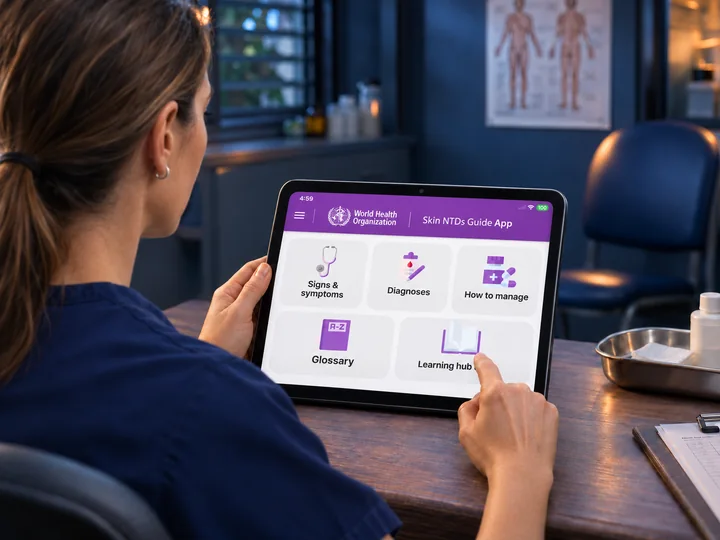
WHO Skin NTDs App
The skin diagnosis app that APPelit developed for Leprastichting formed the basis. APPelit provided information about the structure and contributed to bringing together existing data with additional content.
View the caseRead more
Frequently asked questions about modernising software
Do I need to replace my software entirely?
Not necessarily. Often a large part works well and only a few components are getting in the way. In that case, we can extend or upgrade. Rebuilding is only relevant once the technical setup hinders further development.
What is the difference between renewing, upgrading and rebuilding?
Renewing adds functions, screens or links to a usable base. Upgrading replaces outdated technical components, such as a framework. Rebuilding realises components or the entire application anew. These activities can also be combined.
Will our data be retained?
Existing data can be included. You supply the conversion specifications; APPelit builds and carries out the technical data conversion.
Is a software audit mandatory?
No. An audit is a separate assignment that helps when insight into the existing technology is lacking.

Information security
Secure by design. Demonstrably.
Do you work with personal or healthcare data? Then you want to be sure that your software partner handles information carefully. APPelit is ISO 27001- and NEN 7510-certified.
ISO 27001
The international standard for information security. Risks, access and incidents are recorded in a management system that is periodically assessed.
NEN 7510
The Dutch standard for information security in healthcare. Important when your software works with medical or health data.
- Security requirements included from the very first specification
- Test cases that align with recorded security requirements
- AI functions also fall within the same data agreements
Contact
Do you want to continue with your existing software?
Leave your details. Within 24 hours, a specialist will contact you for an introductory meeting.